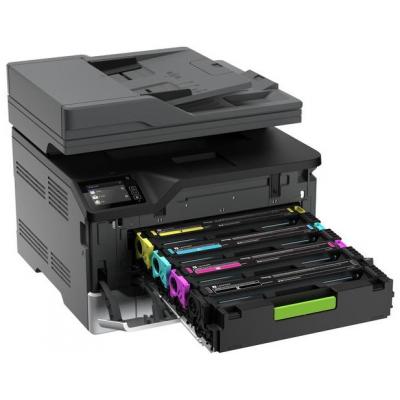
Photocopier Installation Services In Colchester help businesses and schools put a new or replacement machine to work without unnecessary disruption. A photocopier is more than a plug-in device: it needs the right position, a safe power supply, network access, sensible print settings and users who know how to operate it. A planned installation reduces downtime and ensures the equipment supports daily work from its first print.
Whether you are replacing an ageing copier, opening a new office or adding capacity during a busy period, the installation should reflect how your team actually uses documents. Print volumes, colour requirements, scanning destinations and finishing options all affect the best configuration. A professional visit also gives you a chance to resolve practical issues before they become frustrating faults.
Why choose Photocopier Installation Services In Colchester?
Self-installation can appear straightforward, but small details often cause the longest delays. A device may be placed too close to a wall for paper-tray access, connected to an unsuitable network point, or left with default settings that waste toner and paper. Professional installation covers the physical setup and the configuration needed for reliable everyday use.
The right approach begins with access. Engineers consider door widths, stairs, lifts and the copier’s final location before delivery, particularly for larger multifunctional machines. They can then level the unit, fit optional trays or finishers, load the correct paper and test copying, printing and scanning. This avoids moving a heavy machine twice or discovering too late that an outlet or data connection is out of reach.
Electrical safety deserves attention too. The UK’s Electricity at Work Regulations 1989 require electrical systems to be maintained to prevent danger. In practice, this means using an appropriate, accessible supply and avoiding overloaded extension leads. A clear, well-ventilated position also helps prevent overheating and leaves room for routine servicing.
Preparing your site before delivery
A short pre-installation check makes the appointment more efficient. Choose a location close to the people who will use the machine most often, while allowing space for opening doors, refilling paper and replacing toner. Avoid direct sunlight, damp areas and places where a machine could obstruct a fire route. If the copier will scan confidential documents, consider whether the area gives staff enough privacy.
- Confirm building access, parking arrangements and any reception or security procedures for the delivery team.
- Identify a suitable mains socket and network connection near the proposed location.
- Tell your IT contact about the installation date so network details, driver permissions and scan-to-email requirements can be ready.
- Decide which teams need colour printing, secure release printing, scanning folders or finishing functions.
For organisations with managed networks, the copier may need a reserved IP address, approved SMTP settings for scan-to-email, or access to a specific shared folder. These details are easy to overlook because printing might work before scanning does. Raising them early helps ensure every key function is tested during the visit rather than leaving staff to troubleshoot later.
What Photocopier Installation Services In Colchester should include
A thorough installation should start with confirmation that the selected machine meets your requirements. The engineer can check the model, meter reading where relevant, accessories and consumables before placing the device. For a refurbished machine, careful preparation is especially valuable: it should arrive cleaned, tested and ready to be configured for its new environment.
Network setup normally includes installing suitable drivers on agreed computers, setting default paper sizes, testing mono and colour output, and checking duplex printing. Scanning should be tested to the destination you intend to use, such as email, a network folder or a USB device. If user authentication is enabled, a sample user should be able to sign in and release a print job before the installation is signed off.
Training is equally useful. Staff do not need a technical lesson, but they should know how to clear straightforward paper jams, select trays, scan a document, order help and recognise messages that need an engineer. A few minutes of practical guidance can prevent avoidable calls and gives users confidence with features that save time, such as double-sided copying and document feeders.
Support that continues after setup
Installation is the beginning of the machine’s working life, not the end of the service. Reliable support includes planned maintenance, rapid fault diagnosis and a clear route for ordering toner or requesting assistance. Regular servicing can identify worn rollers, feed issues and image-quality problems before they interrupt a busy school office or business department.
V Technical supplies new and refurbished photocopiers and printers, with flexible rental options as well as ongoing servicing and repairs. Its in-house engineers support organisations across the South East, including Essex, and can help match a machine and installation plan to your space, usage and budget. Refurbished equipment is prepared in its Kent workshop, offering a practical option for customers seeking dependable equipment with a lower environmental impact.
Photocopier Installation Services In Colchester for schools and offices
Schools often need different settings from commercial offices. Departmental codes can help monitor usage, while secure printing can reduce the risk of sensitive pupil or staff information being left in an output tray. Busy reception areas may prioritise fast scanning and reliable stapling, whereas a classroom-adjacent machine may need simple controls and carefully planned placement to keep access safe.
Offices benefit from similar planning, especially where several teams share one device. Setting sensible defaults for black-and-white and double-sided printing can control costs without preventing colour work where it is genuinely needed. The installer can also explain which paper types are suitable for the machine, helping to avoid jams, poor print quality and damage caused by unsuitable labels or heavy stock.
Frequently Asked Questions
How long does photocopier installation take?
Most straightforward installations can be completed within a single visit. Timing depends on access, the number of computers requiring drivers, optional accessories and whether scan-to-email or network folders need configuration.
Can an existing photocopier be removed?
Yes. Discuss removal before booking so collection, access and any data considerations can be planned. If the machine stores jobs or address-book details, ask for its data to be cleared appropriately.
Do we need our IT provider present?
Not always, but access to the right network information is helpful. An IT contact should be available if firewall rules, email settings or administrator permissions are needed.
Will staff receive training?
Basic user guidance can be provided during installation, covering everyday copying, printing, scanning and simple checks. Further support is available if your team needs more detailed help.
For Photocopier Installation Services In Colchester that cover delivery, setup, training and ongoing care, contact V Technical to discuss the right solution for your organisation.